Paid product · One-time USD 29
Drupal 7 to Drupal 11 Migration Workbook
Seven tabs for the decisions that stall a migration long before the first import runs: what content you are carrying, where every source field lands, which modules survive, which URLs must keep working, and what has to pass before launch.
One .xlsx file. No account, no macros, no add-ons, and it never connects to a Drupal site. Refund within 14 days by email.
What it is, and what it is not
Drupal 7 reached end of life in January 2025. The technical migration is well documented; the part that goes wrong is the record-keeping around it. Content decisions live in one spreadsheet, field mappings in a developer's notes, module research in a ticket comment, redirects in somebody's head, and nobody can answer “are we ready to launch?” without a meeting.
This workbook is that record in one file. It is a planning tool: structured tables, dropdowns bound to a shared status vocabulary, and a formula-driven readiness summary on the Overview tab.
It is not a migration engine. It does not connect to a Drupal site, read your database, export content, write migration YAML, or replace backups, staging, and automated tests. If you want something that reads a codebase, that is the free scanner, and it costs nothing.
The seven tabs, column by column
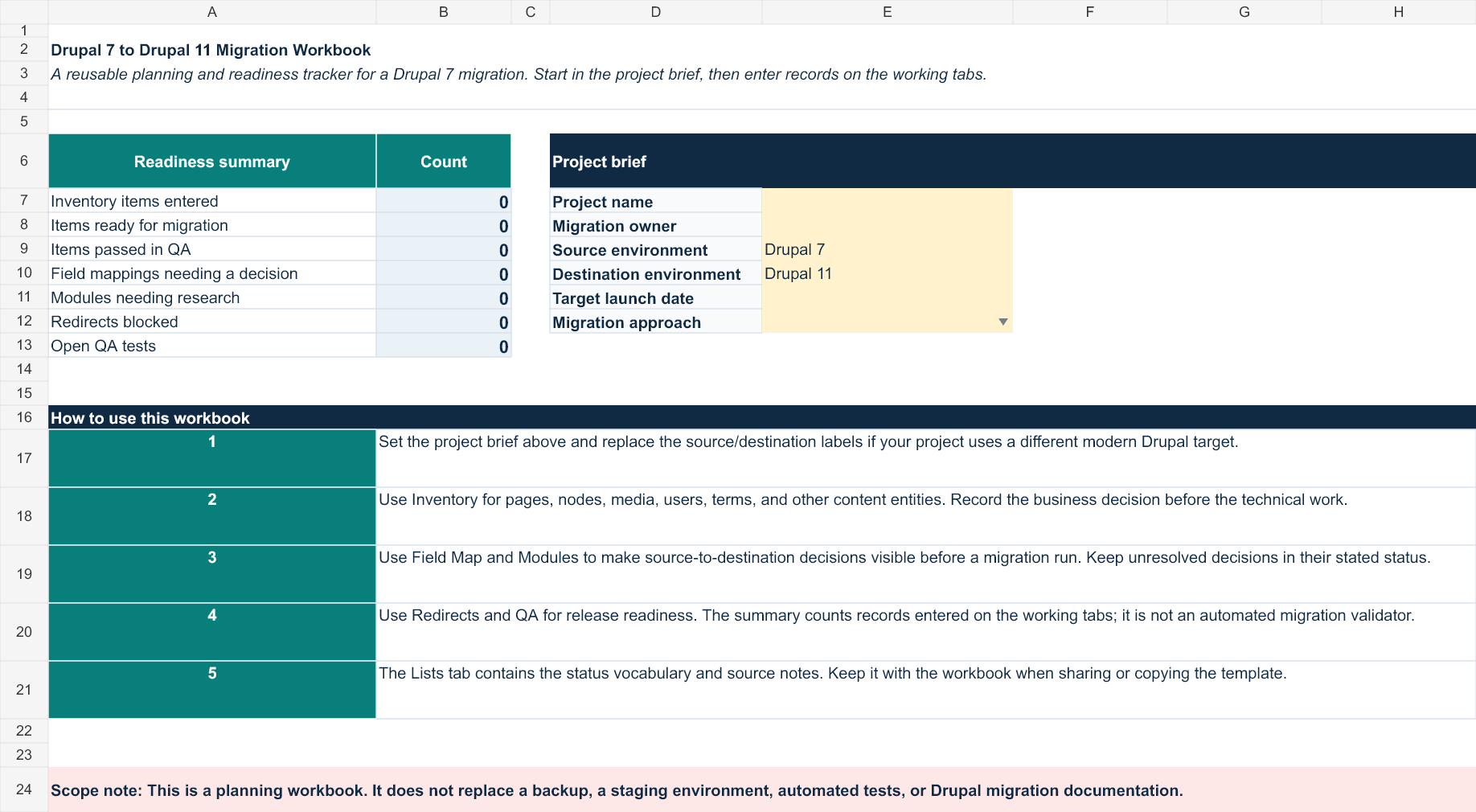
Every screenshot below is rendered from the file you receive, not from a mock-up, and the column lists are read out of that same file. Rows 8 and down are empty and waiting for your project; the shaded cells carry dropdowns.
1. Overview
A six-field project brief — project name, migration owner, source environment, destination environment, target launch date, migration approach — beside seven live counts: inventory items entered, items ready for migration, items passed in QA, field mappings needing a decision, modules needing research, redirects blocked, and open QA tests. Shown at the top of this page.
2. Inventory

Twelve columns: Record ID, Source URL / ID, Content type, Title / label, Business owner, Last reviewed, Content decision, Destination type, Destination URL, Migration status, QA status, Notes.
3. Field Map

Twelve columns: Map ID, Source content type, Source field, Source field type, Cardinality, Destination content type, Destination field, Mapping approach, Decision status, Owner, Test status, Notes.
4. Modules
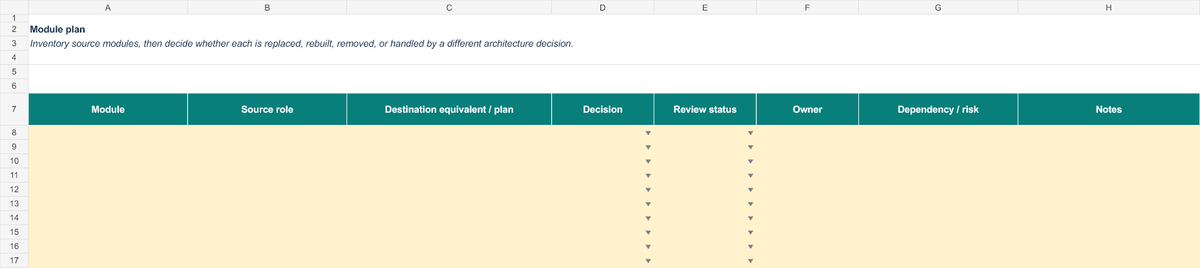
Eight columns: Module, Source role, Destination equivalent / plan, Decision, Review status, Owner, Dependency / risk, Notes.
5. Redirects
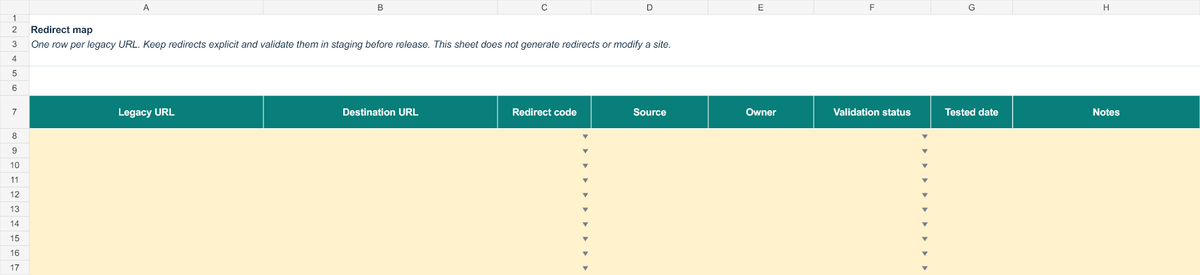
Eight columns: Legacy URL, Destination URL, Redirect code, Source, Owner, Validation status, Tested date, Notes.
6. QA
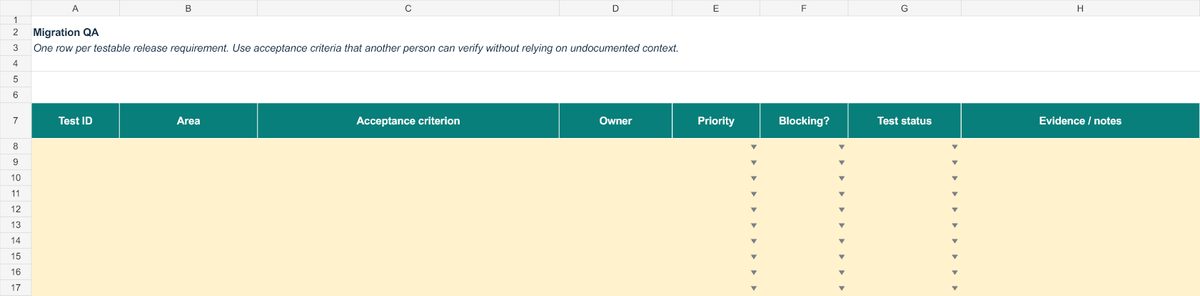
Eight columns: Test ID, Area, Acceptance criterion, Owner, Priority, Blocking?, Test status, Evidence / notes.
7. Lists
The ten status vocabularies behind the dropdowns — content decision, migration status, QA status, mapping approach, mapping decision, module decision, module review, redirect code, redirect validation, and QA test status — so that “blocked” means the same thing on every tab. Alongside them, four Drupal.org sources with a line on why each one matters for planning: the end-of-life notice, the Drupal 6/7 upgrade preparation guidance, the upgrade path documentation, and the field mapping reference.
The workbook translates that published guidance into editable records. It is not endorsed by or affiliated with the Drupal Association.
Who it is for
- A Drupal agency preparing a Drupal 7 migration for a client.
- A technical project manager who needs a defensible record of migration decisions.
- A site owner coordinating contributors without giving them production access.
It is the wrong purchase if you want the migration run for you, if you need technical discovery or a security review, or if you were hoping for something that pulls content out of a live site. None of those is what this is.
Try the free things first
Two of the three parts of this are free, and they are free on purpose — you should be able to tell whether the paid one is worth $29 before paying for it.
- The kickoff checklist is the ten decisions this workbook is built around, each with a test for telling when it is genuinely settled. No signup, no email.
- The inventory scanner reads a Drupal 7 codebase and reports what forces a decision — custom code, fields with no obvious destination, and the real Drupal 10/11 release status of every contributed module. One file, MIT licensed, also in VS Code.
The scanner tells you what you are carrying. The checklist tells you what has to be decided. The workbook is where those decisions get written down and tracked to launch. If the first two are enough for your project, use them and keep your money.
How you receive it
Checkout is a Stripe payment page. Nothing is stored here: card details go to Stripe and never touch this site. After a completed payment you are returned to a download link for the .xlsx, signed and valid for 24 hours. If you miss it or the link expires, email hello@practicalmodules.com and you will be sent the file.
There is no account to create, no mailing list, and no follow-up marketing.
Licence and refund
One purchase permits an organization to copy and adapt the workbook for its own internal client work — including on more than one project. Do not resell it, redistribute it, or publish it as a standalone template.
Request a refund within 14 days of purchase by emailing hello@practicalmodules.com. No form and no reason required.
The price is USD 29, one time. There is no subscription, and no consulting is included.
Questions
Does this migrate my Drupal 7 site? No. It helps a team plan and track the work around a migration. The import itself is done with Drupal's own migrate tooling.
Will it work for a destination other than Drupal 11? The structure and status vocabulary are reusable, but the source notes are written for Drupal 7 to Drupal 11 planning. The destination label is a field in the project brief, so change it.
Do I need Microsoft Excel? It is a standard .xlsx with tables, dropdowns, and simple formulas, and no macros. Google Sheets and LibreOffice Calc open it; as with any spreadsheet moved between applications, check the dropdowns look right before a team relies on them.
Can I use it for more than one client project? Yes, inside your organization. See the licence above.
Is there support? Email hello@practicalmodules.com with a question about the workbook and you will get an answer. Consulting on your migration is not included.
Drupal 7 to Drupal 11 Migration Workbook
Seven tabs, ten shared status vocabularies, and a readiness summary that updates itself. One .xlsx, USD 29, one time.
14-day refund by email. No account, no macros, no site connection.